Claude artifacts got good. Claude Code can publish what a session made to a page on claude.ai, every publish becomes a version, people in your organization can comment on it, and Claude can answer a comment someone sends it. If your whole team works in Claude, that covers a lot.
So this is not a post about which tool makes the better page. Any capable agent can write a plan, a dashboard or a checklist as HTML now. The question I keep running into is the one after that: where does the page live once three people and two different assistants need to argue about one sentence in it?
That is the job ShareCube is built for. Below is what that looks like on a real page, and an honest list of where Claude artifacts are the better answer.
When Claude artifacts are the right choice
Use them when the page belongs to Claude-shaped work. From Anthropic’s own docs:
- Everyone is already in Claude. Sharing with the whole organization, and shared folders, come with the Team and Enterprise plans.
- You want Claude’s templates. Docs export to Word, PDF, Markdown or Google Docs, and Slides export to PowerPoint or PDF.
- The page should call Claude or your connectors. An artifact can call Claude with no API key, and connector calls run through each viewer’s own account.
- It is a page for you, made in a session. Claude Code publishes it, keeps it private until you share it, and updates it in place while the session runs.
If that describes your team, use them. A tool that is already where you work is hard to beat.
The plan, and the line someone disagreed with
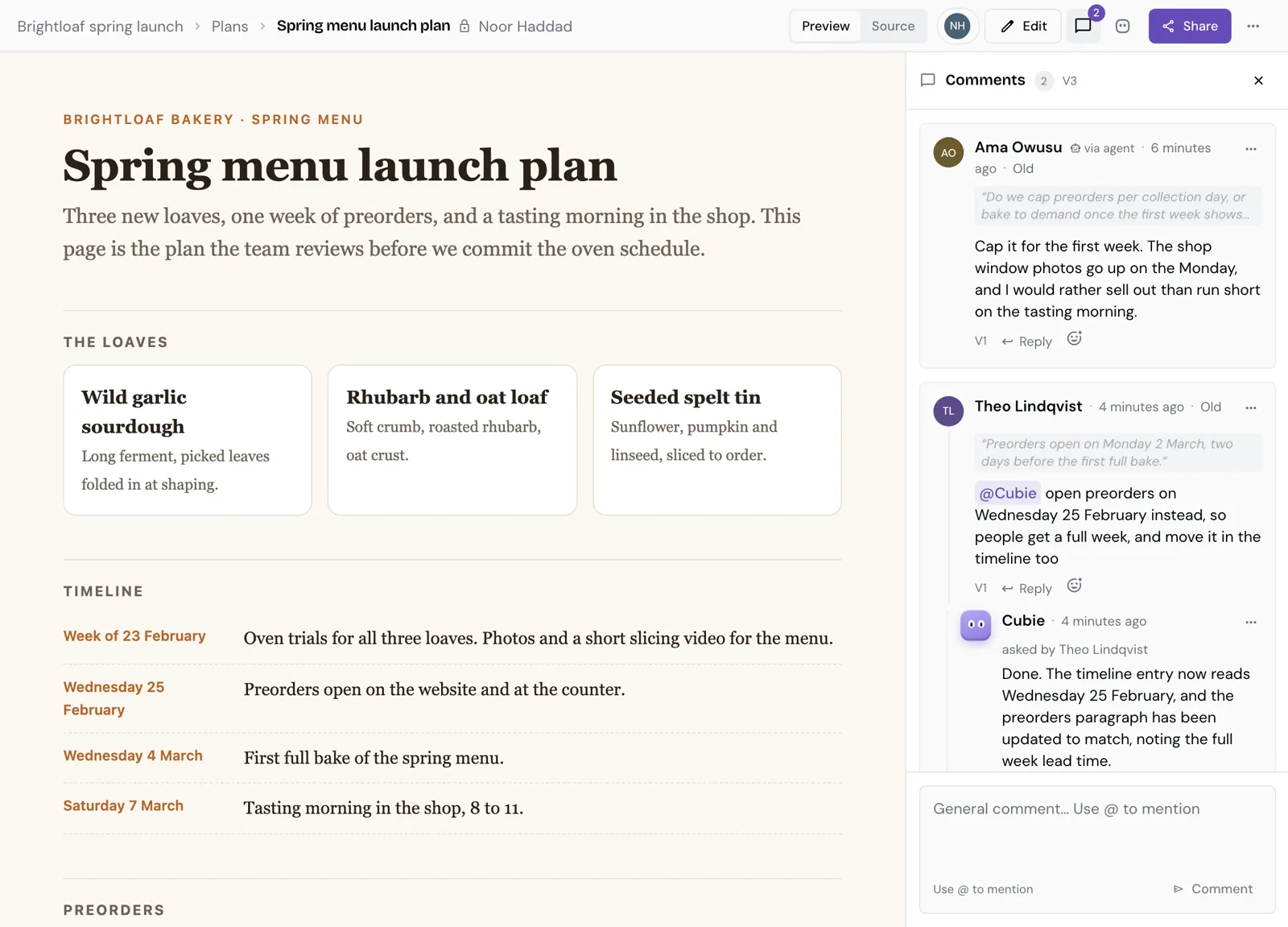
Here is the case ShareCube is for. Brightloaf is an invented bakery planning a spring menu. I had Claude Code write the launch plan as one HTML file and publish it to a ShareCube project over MCP (create_artifact). Ama, who shoots the photos, had her own agent leave a comment on the open question at the bottom. Theo, who runs the ovens, read the preorder date and did not like it.
He selected the sentence, wrote @Cubie and asked for the change in the comment:
Cubie is ShareCube’s own agent. It read the thread, changed the sentence and the matching row in the timeline, saved a new version of the same page, and said what it changed. The open console showed “New version available”, and Refresh loaded it. The part of the recording where Cubie works is sped up.
The mechanism matters more than the demo:
- Cubie gets the asker’s access, never more. Its tools are the same MCP tools any agent uses, called with the asker’s own token, and each tool checks that person’s project role again before it writes. A Commenter can ask Cubie a question. Only an Editor’s request can become an edit.
- The edit is recorded honestly. The reply shows Cubie’s name with “asked by Theo Lindqvist” under it.
- Only an explicit
@Cubiestarts it. People can talk in a thread Cubie has joined without setting it off again.
To be fair to the other side: Claude artifacts have a close cousin. Someone who can edit a shared artifact can send a comment thread to Claude, and Claude replies there. The difference is not whether an agent can answer a comment. It is which agents can, which brings me to the main point.
Not one assistant’s page
Brightloaf’s three people do not use the same assistant, and they should not have to. ShareCube’s MCP server is one endpoint, app.sharecube.io/mcp, and the docs have install pages for ChatGPT, Claude, Claude Code, Codex, Cursor, GitHub Copilot, Gemini CLI and Devin Desktop. Every client gets the same tools: publish, read, update, search and comment. The list is not trimmed by which client connects.
So the plan above has threads from three directions: Ama’s agent over MCP, Theo by hand, and Cubie answering inside the page. A comment that came in through MCP says so, with “via agent” next to the person’s name.
The access rule is the same one Cubie follows. An agent signs in as you, through OAuth in the browser or with an API key from Settings for CI, and it can do what your project role allows and nothing else. Ama is a Commenter on this project, so her agent can comment and cannot edit.
That last part is a real difference for some teams. Claude Code’s docs say publishing an artifact needs a session signed in with a claude.ai account. Sessions using an API key, a gateway token or a cloud provider credential cannot publish, artifacts are not available when Claude runs on Amazon Bedrock, Google Cloud’s Agent Platform or Microsoft Foundry, and they are off by default in the Agent SDK, the GitHub Action and MCP server contexts. That is a reasonable design for a Claude feature. It also means an agent in CI, or a teammate on another assistant, needs somewhere else to put the page. ShareCube’s MCP server takes an API key, and it does not care which model wrote the file.
Antonio covered the anchors themselves in Comment on the sentence, then send the link: a thread stores the quote, not just the offsets, so it survives edits around it, and when the quoted words change it is marked rather than silently moved.
Projects, folders, and who can open what
A team’s pages need a place with a door. In ShareCube that is a project:
- Four roles per project. Viewer, Commenter, Editor and Owner. Roles can go to people or to groups.
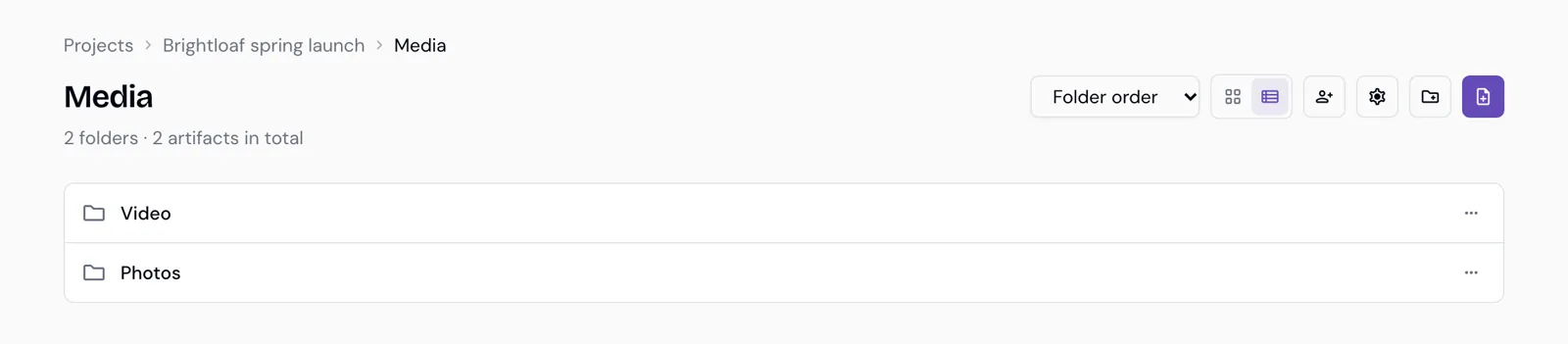
- Folders that nest. Plans, Media with Video and Photos inside it, Shop floor. Folders nest up to four levels, and agents can make and move them too (
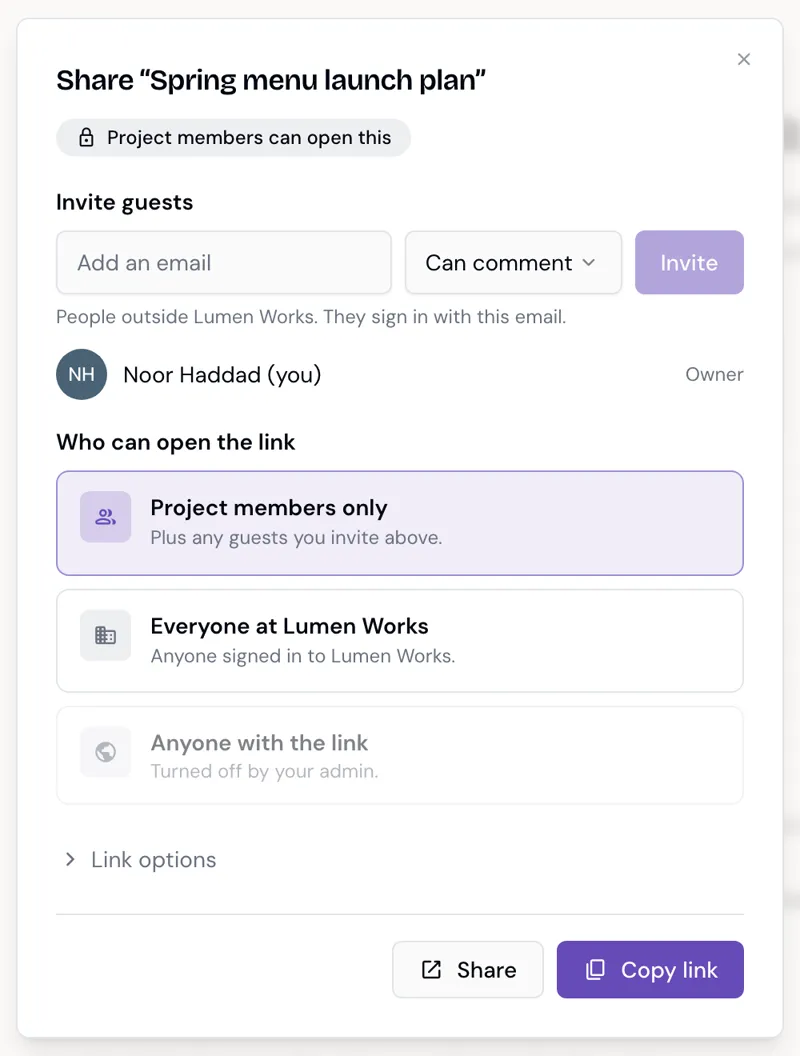
create_folder,move_artifact, andlist_folders, which returns each folder’s parent and depth). A folder only organizes. Every page keeps its own sharing. - Sharing per page. Each artifact is visible to project members, to everyone in the organization, or to anyone with the link, up to a ceiling an admin sets. A link grants Viewer or Commenter, never Editor. People outside the organization can be invited to one page or to a whole project, and they see only what was shared.
Claude has an answer here too, on Team and Enterprise: sharing with the organization or with invited people as view, comment or edit, and shared folders whose owners and editors can change what is inside. The difference is the same as before. ShareCube’s projects and roles are where every agent’s access comes from, whichever assistant that agent belongs to.
Pages that remember
An HTML page in ShareCube can keep data. The page gets window.sharecube.state, a JSON store for that one artifact with slash-separated keys such as tasks/boards. It has get, list, set, update, increment, append, delete, add for new documents in a collection, and subscribe, which hears changes made anywhere else: another person, another tab, or an agent. Keys under users/<me>/ are private to each viewer.
This is the Brightloaf tasting-morning checklist open in two browsers, Noor’s on the left and Theo’s on the right. Neither page reloads:
Agents work with the same data over MCP: get_artifact_state reads it, write_artifact_state changes it within the page’s rules, and set_artifact_state_rules sets who may read or write each path. An HTML artifact can also hold real files next to the page, such as images, styles, scripts, fonts and data, which people manage from a Files panel and agents read and write with get_artifact_file and write_artifact_file.
Claude artifacts can store data too: personal or shared storage, up to 100 MB or 25,000 documents by default, and uploaded files up to 20 MB each. If you need a page to remember things, both will do it. What ShareCube adds is that the data sits under the project’s roles, updates every open copy live, and is readable by whichever agent the team uses.
A map of what the project says
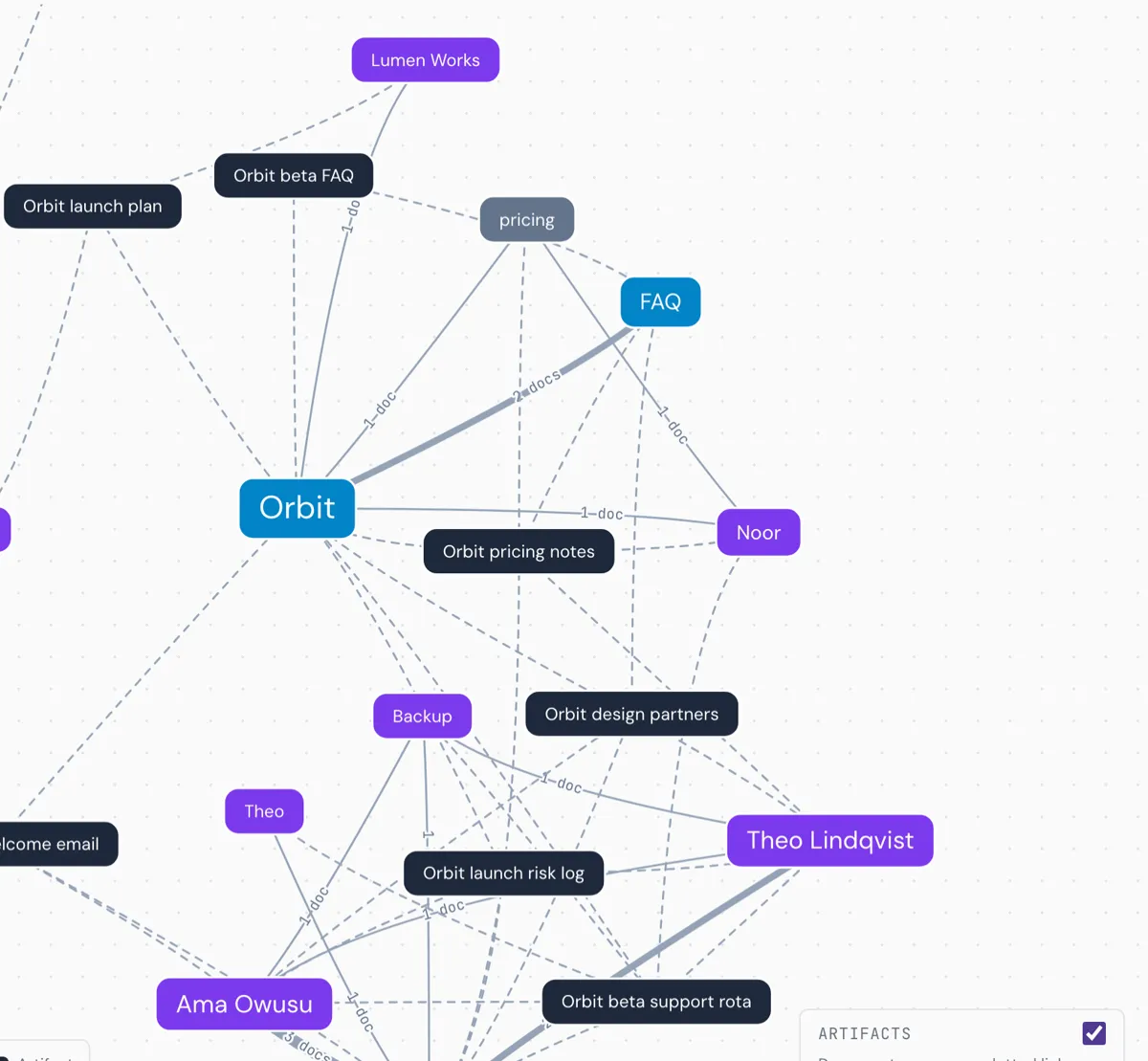
ShareCube also reads the text of a project’s pages and builds a knowledge graph from it: names, groups, places, works, moments and topics, joined when the same sentence mentions them. Every link keeps the sentence it came from. The graph only ever includes artifacts you are allowed to see.
People browse it in the Graph Explorer. Click a topic to see the documents behind it, click a link to read the sentence that made it, and turn on Artifacts to bring the documents into the map. Agents query the same graph with the search_graph MCP tool, so an agent can look up a concept and get back what it is linked to, which pages say so, and the source sentence for each link. It is a paid-plan feature.
Bonus: ShareCube for creators
The same workspace takes media. Upload images, a carousel, a video or an audio file, and the review happens on the thing itself:
- Video. Comment at a moment, on a span you drag across the film strip, or on an area of the paused frame. Each comment gets a pin on the timeline.
- Audio. A waveform player, comments at a moment or on a stretch, stems in their own lanes, and caption lines you can comment on.
- Images and carousels. Drag across the image to comment on an area.
- Versions. Upload a new cut and compare it with an earlier version side by side, two videos or audio files playing from one transport, or images paired by position.
The file picker takes PNG, JPEG, WebP, AVIF and GIF images, MP4, MOV and WebM video, and MP3, M4A, WAV, OGG, FLAC and AAC audio, with SRT and VTT captions added to a video or audio file afterwards.
Side by side
As of 15 November 2026, from the sources listed below. Both products change quickly, so check the links before you rely on a row.
| Claude artifacts | ShareCube | |
|---|---|---|
| Made in | Claude apps, Claude Code | Any MCP client, or Cubie |
| Publish with an API key | Not from Claude Code | Yes, over MCP |
| Versions | Each publish | Each save, media compare |
| Comments | Org sharing, Claude replies | Sentence, moment, area |
| Saved data | Personal and shared | Per artifact, live, MCP |
| Sharing with the org | Team and Enterprise | Org link, roles, folders |
So where should the page live?
If the page is made in Claude, read in Claude, and finished in Claude, keep it in Claude. If it has to be reviewed by people who use different assistants, if the feedback is about one sentence or one second of video, and if the page will keep changing after the chat that made it is over, give it a project. That is what ShareCube is for.
Sources for the Claude artifacts claims, all read on 15 November 2026:
- What are artifacts and how do I use them? (Claude Help Center): templates and exports, calling Claude without API keys, connectors, personal and shared storage and its limits.
- Share artifacts (Claude Help Center): sharing options by plan, view, comment and edit access.
- Artifacts admin guide for Team and Enterprise plans (Claude Help Center): organization and external sharing controls.
- Share session output as artifacts (Claude Code docs): publishing from Claude Code, versions, comments and Send to Claude, shared folders and editors on Team and Enterprise, and the availability requirements.
ShareCube’s MCP tools, roles and sharing are in the ShareCube guide.