The last post ended on a comment labelled “Earlier version”. Noor said the knife comes in too late at 0:03. Theo cut a new teaser that opens on the knife and warmed up the grade. The label is honest: the moment may have moved. But it leaves the reviewer with two tabs, two scrub bars and a memory of what V1 looked like.
What changes when a cut is replaced
Replacing the video, from Files and then Replace, makes a new version. The comments panel marks the split with a line, “V1 was updated to V2”, and every thread made on the old bytes carries “Earlier version”. On V2’s own film strip only V2’s comments have pins.
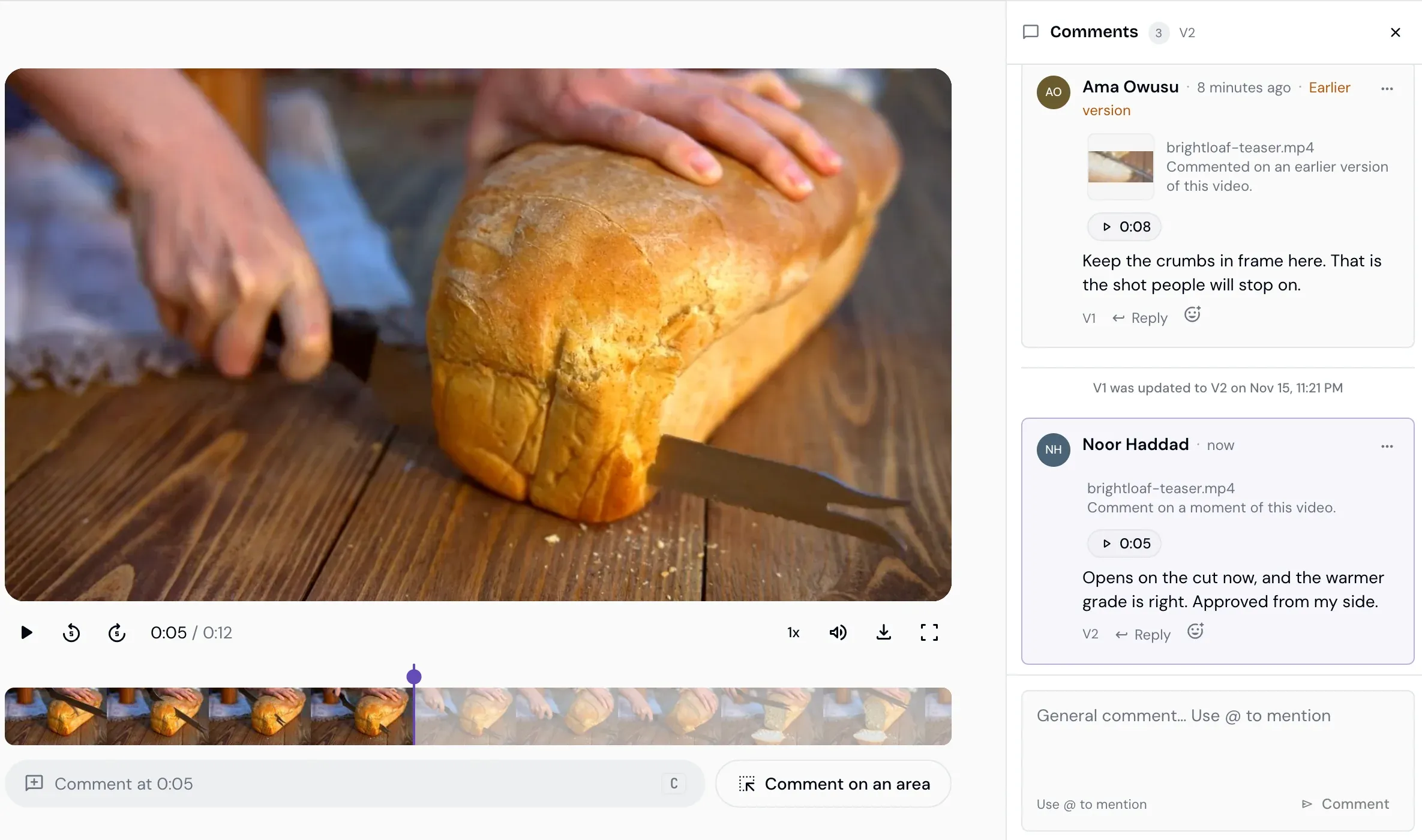
The V numbers are worked out in the browser. The stored version ids are storage object versions, not V1 and V2, so the console sorts the versions by when they were made and numbers them from the oldest. A comment knows its version from the versionId on its anchor.
Two versions, one transport
Version history has a “Compare with current” link on every earlier version of a video, an audio file, an image or a carousel. It opens both versions in place of the player: “Comparing V1 with V2”, the earlier one on the left, the current one on the right.
There is one play button and one position bar. Two video elements will not stay in step on their own, so one side keeps the time and the other follows. The longer file leads (the earlier one on a tie), and the other is moved to its time whenever they drift more than 120 ms apart. When one version is shorter, it stops at its own end and the other plays on.
The two sides sit side by side when the view is at least 900 px wide, and one over the other below that. It is the width of the view, not the window, because the comments panel can take part of a wide screen.
Listen to
Two soundtracks at once is noise. “Listen to” with V1 and V2 picks the side you hear and mutes the other, without stopping playback. In the teaser you can see the cut and the grade change, but the music only differs by ear: V2’s bed starts at a different place in the track. You switch, and the picture keeps playing in step.
Each side marks its own comments
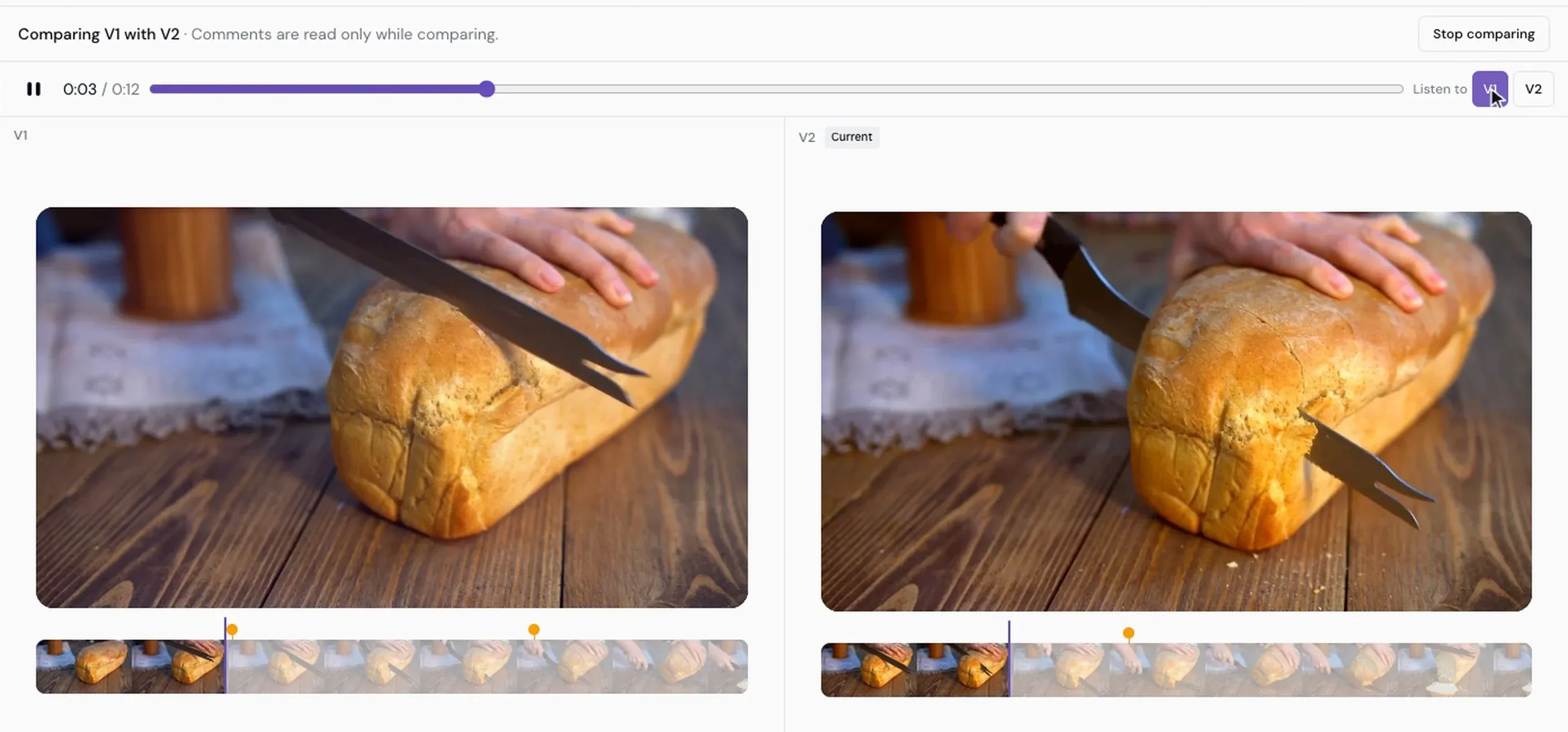
V1 shows two pins, Noor’s at 0:03 and Ama’s area at 0:08. V2 shows one, Noor’s approval at 0:05. The rule is short. A side marks a comment only if the sha256 on its anchor is a file that version holds. The server’s usual reading of a comment, made against the current files, is dropped in this view, so a V1 comment is drawn on V1 as it was made, not as “Earlier version” on V2.
Comments are read only while you compare. Clicking a pin opens its thread and moves the shared transport, so both cuts jump to that moment together. That is the review I wanted: open Noor’s 0:03 note on the left, and the right side shows what Theo did about it.
Pictures and edge cases
Images and carousels compare the same way, without a transport. Slides are paired by their place in the order, and a slide that one version does not have reads “No image here in this version”. Two versions that hold different kinds of media, a video and then an image, are not compared: ShareCube says so instead of guessing a pairing. Escape closes Compare, unless something else on the page has claimed it.
Compare is only offered where the history already lists both versions. A reader for whom earlier versions are hidden never sees the link, and nothing new was added on the server for it: it reads both versions through the access a member already has.
Media comments and the anchor they store are in Comment at 0:03. Text comments and orphaned threads are in Comment on the sentence.